Missivio — Full Case Study
Before this project was a project, it was a pattern I kept watching at work.
For several years, I managed email marketing for B2B and B2C clients, hands-on in Mailchimp and Klaviyo, building campaigns, training colleagues, collaborating with sales teams on segmentation and timing. The work taught me both platforms inside out, but more usefully, it taught me how non-marketers actually behave in front of them.
What I kept seeing wasn't people struggling with features. It was people freezing before they even opened the editor. A colleague would sit down to send a welcome email and stop at the audience step. A founder would log in to review a sequence and close the tab. The platforms were ready to help them execute, but they weren't sure what they were trying to execute, and nothing on the screen told them.
The terminology assumed familiarity, and the logic assumed intent. If you didn't already understand what a welcome sequence was supposed to achieve (what role it played in a customer's journey, why it existed at all) no part of the interface was going to teach you. Without context, the tools were overwhelming. Without someone to ask, that confusion became inaction. And for solo operators running admin, sales, customer service and marketing all at once, the famous “one-man team”, there was simply no one to ask.
This is the part of the problem the existing market wasn't solving. The tools offered execution. None of them answered the first question: what should I actually be doing?
That gap became Missivio's premise and the starting point of every design decision that followed.
The case for email marketing isn't the issue. Email is one of the most effective channels available to small businesses, and most owners know it. They've heard the open-rate stats. They've watched competitors send thoughtful campaigns. The intent is there.
What's missing is the bridge between intent and action. The platforms designed to serve small businesses assume a level of marketing knowledge their users don't have, and that mismatch turns a high-leverage channel into an abandoned tab. People sign up, set up a list, open the editor, and stall.
To check whether this was specific to the people I'd worked with or something structural, I audited the major platforms in the space. The pattern was the same across every single one.
| Platform | Templates | Automation | Strategic Guidance |
|---|---|---|---|
| MailerLite | ✓ | ✓ | ✗ |
| Brevo | ✓ | ✓ | ✗ |
| Moosend | ✓ | ✓ | ✗ |
| Mailchimp | ✓ | ✓ | ✗ |
| Klaviyo | ✓ | ✓ | ✗ |
| Omnisend | ✓ | ✓ | ✗ |
Every tool offered templates. Every tool offered automation. None of them offered strategic guidance. The market had collectively decided that strategy was the user's responsibility, even when the user was a solo founder who had never written a marketing email in their life. This wasn't a gap in one product. It was the shape of the entire category.
That reframed the opportunity. The problem wasn't a missing feature. It was a missing layer. Templates help with execution if you already know what you're trying to achieve. Automation runs on a strategy you've already built. None of it helped the moment a user stared at a blank dashboard and asked the question every other tool had skipped: what should I actually be doing?
The hypothesis that came out of this became Missivio's foundation:
The AI handles the strategy. You just approve and send.
A platform where the recommendation is the entry point, not a feature. Where the tool answers the first question before asking the user to make a decision they're not equipped to make. That hypothesis is what the rest of this case study tested.
Before designing anything, I needed to confirm two things: that the gap I'd watched in real time was structural, and that the people sitting on the other side of it would recognize themselves in how I described the problem.
METHODOLOGY 5 user interviews, 30 to 45 minutes each, remote and recorded Mix of solo founders, agency staff, and e-commerce operators Semi-structured, behavior-led conversations 6-platform competitive audit covering features, AI usage, and positioning Synthesis through affinity mapping, POV statements, and HMW questions Output: 2 personas, 3 problem areas, 1 design hypothesis
Competitive Analysis
I started with the market because individual pain points only mean something against the context they sit in. If every competing platform had a strategic guidance layer, the people I'd watched freeze had a usage problem. If none of them did, the gap was the category itself.
The audit confirmed the second answer. Every platform used AI as a copywriting accelerator, never as a strategist. Mailchimp's “Write with AI,” Brevo's Aura assistant, Klaviyo's predictive analytics: every implementation assumed the user already knew what they were trying to send and to whom. The AI was helping with the last 20% of the work. The first 80%, the strategic decisions, was still entirely on the user.
User Interviews
I spoke with five small business owners and operators across service-based, e-commerce, and agency contexts. The goal wasn't to validate a feature list. It was to understand what people actually did when they got stuck.
Four patterns came up in every single conversation:
Thirty to forty-five minutes per email (5/5) Time was the cost users felt most acutely. “Anywhere between 30 and 45 minutes pretty soon.”
Everyone emails everyone (5/5) Segmentation was theoretically valuable but practically untouched. The default was always: send to the whole list.
AI is there, but trust isn't (5/5) All five used ChatGPT or similar to draft copy. None of them fully trusted the output, and all of them edited heavily.
Willingness to pay for strategic AI (5/5) Every participant said they'd pay more for a tool that recommended who to email and why, not just helped write the message.
Those four patterns shaped every subsequent design decision. They confirmed the problem space, validated the value proposition, and surfaced the constraint that mattered most: users wanted recommendations, but only if they could still review and approve before anything went out.
Synthesis: Points of View and How Might We Questions
I translated the patterns into three problem statements, each one paired with the questions it opened up.
POV 1: Remove Strategic Paralysis Through Guidance.
Small business owners who lack marketing expertise need strategic recommendations for email campaigns, because not knowing who to target or what to say leads them to underperformative emails and decision paralysis.
How might we make the recommendation process transparent so founders understand the reasoning behind suggestions?
POV 2: Make Email Strategic And Personal
Brand founders who want to continuously improve need AI-powered strategic recommendations that they can edit and refine, because they fear generic AI outputs will sound robotic and inauthentic, yet creating everything from scratch without guidance feels impossible.
How might we give founders the right starting point, not a finished campaign, so they can add their authentic voice?
POV 3: Show Performance Impact
Non-marketing business owners need a clear connection between email campaigns and actual business results, because seeing data without understanding impact leaves them doubting whether email is worth their time and energy.
How might we connect email performance to actual revenue and business outcome metrics that matter to their specific business?
These three POVs became the north stars I tested every later design decision against.
Personas
Two personas emerged. Distinct in their relationship to the problem, united by the same underlying paralysis.
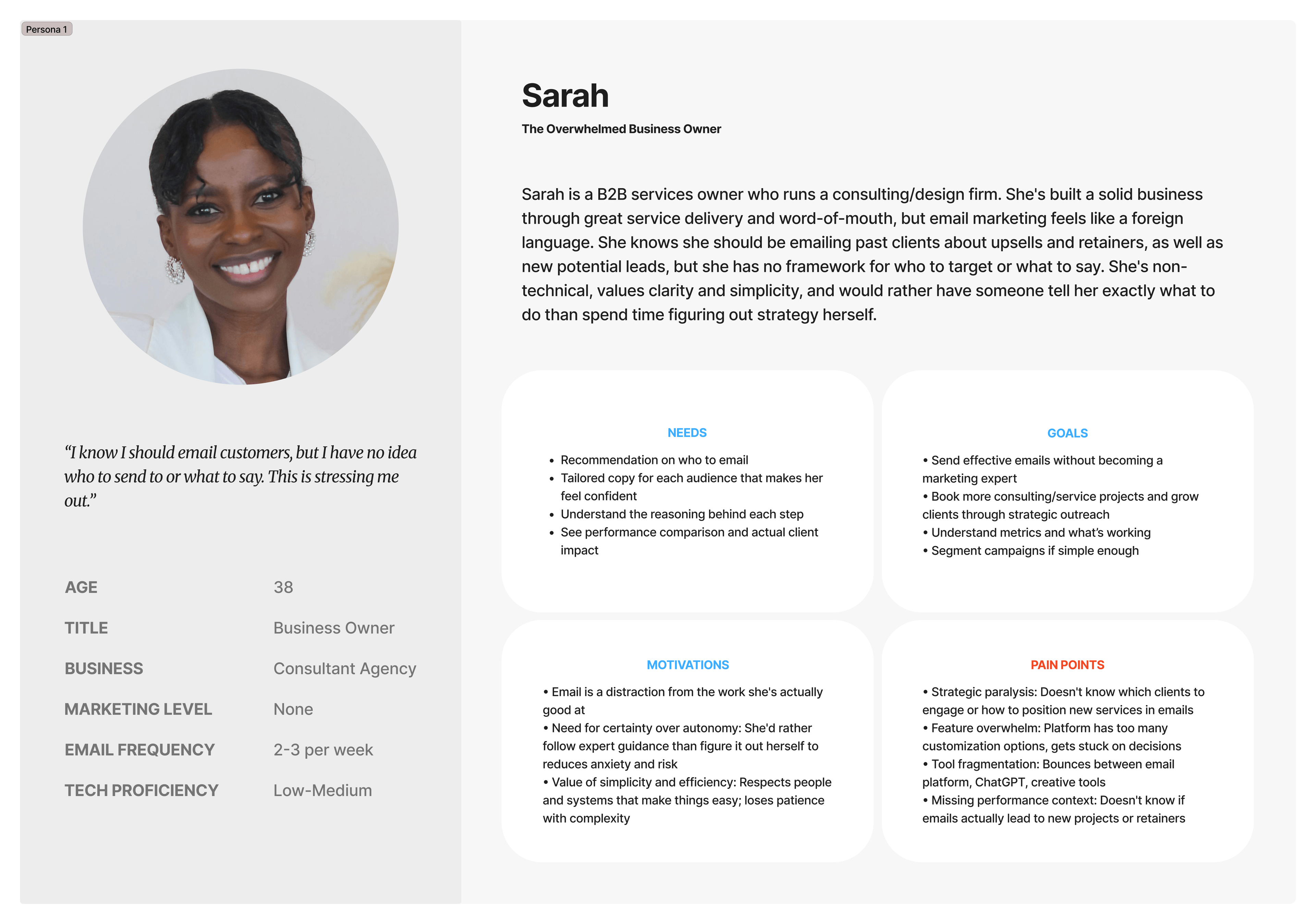
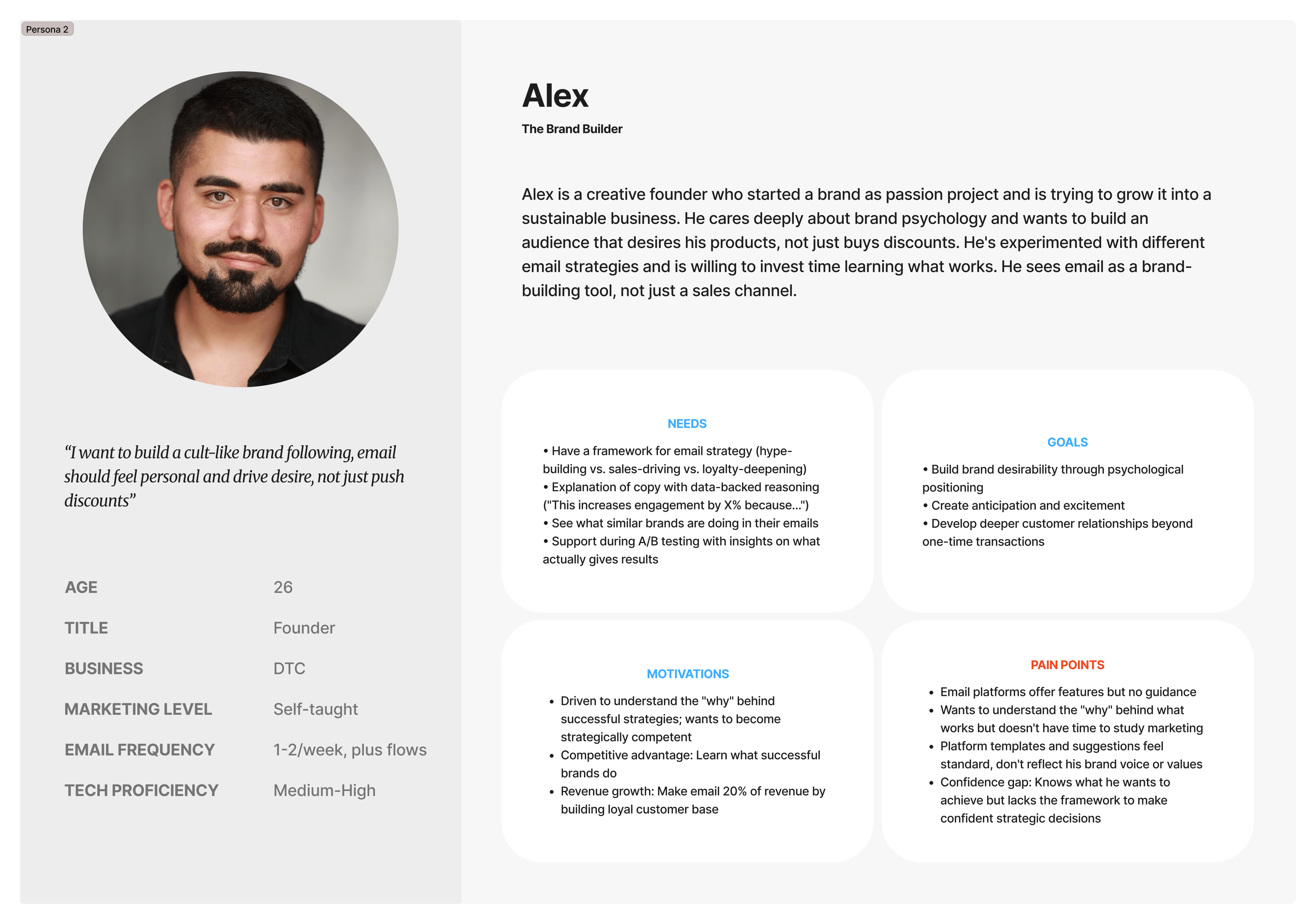
Both personas share the same starting state: capable people who know they should be sending emails, who have the tools to send them, and who don't know what to send or to whom. Designing for both meant designing for the underlying paralysis, not the surface request.
Once the research was synthesized, this stopped being a hypothesis and started being a design contract. Every screen, every flow, every micro-interaction had to deliver on the same promise.
The AI handles the strategy. You just approve and send.
That single sentence is what Missivio owes the user. The AI does the work the user doesn't know how to do. The user holds the power to approve everything before it goes out. Both halves had to be visible at every step. Strategy without approval would feel like a black box. Approval without strategy would feel like the same blank-page problem every other tool already had.
To honor that contract consistently, three principles guided the design from research through final iteration.
- AI Proposes, never acts. Every recommendation the AI generates requires explicit user approval before anything goes live, whether that's segments to target, copy to send, send time, or sequence trigger. This was a deliberate trust decision, not a technical limitation. It became the foundation of every approval moment in the product, from the disabled “Activate” CTA on the sequence overview to the activation modal that requires deliberate user action to dismiss.
- Anxiety reduction is a design goal. The target users are small business owners already carrying marketing as one of many overlapping responsibilities. Adding visual or cognitive weight to that load undermines the product's premise. This principle shaped the muted Iris violet palette (deliberately differentiated from the blue, teal, and green tones the rest of the category leans on), plain-language framing throughout, and the absence of pressure or urgency cues in any AI suggestion.
- Progressive disclosure over information density. Users get what they need at the moment, with depth available on demand. The “Why this way?” button replaces the dense reasoning panels that early testing showed users instinctively avoided. AI rationale sits behind a side modal, not inline. Helper text lives behind tooltips. The interface shows confidence; the depth is one tap away.
These three principles became the test I ran every later design decision against: does this honor the contract, or does it quietly break it?
Constraints
A focused MVP meant being deliberate about what wasn't going to be built. Every constraint below was a scope decision rather than a limitation, made early so the design stayed disciplined.
- Token efficiency. AI interactions were designed to be concise by necessity. Every prompt, response, and side panel was budgeted against the cost of the underlying model.
- Limited launch functionality. No ability to add or remove emails from a sequence. No dynamic content in email templates. Minimal template customisation. The editor was deliberately constrained to guide users toward completion rather than overwhelm them with options.
- No A/B testing. Flagged in research as a valued feature, but deprioritised to keep the first-use experience focused. This was the hardest cut, since it surfaced in both interviews and competitive analysis as a meaningful signal.
- Desktop-first scope. The design is mobile-aware, but optimised for desktop. Research showed the target audience preferred working from their laptop when handling business workflows, so the desktop view became the primary build target.
- Single-user accounts only. No team or multi-seat functionality. This ruled out collaborative editing or approval workflows, which would have required a different trust model than what the research supported for the MVP.
The discipline these constraints created mattered more than any individual one. A focused product was easier to test, easier to iterate, and easier to defend in usability sessions when scope creep would have made every finding ambiguous.
With the principles defined, the next question was structural: how do you organize a product where the AI is supposed to be the entry point? Most email tools structure their navigation around features. Missivio had to structure it around outcomes, because outcomes were the only thing users could reliably map onto their own intent.
Two structural decisions did most of the work.
- Two content types, not one. The product is built around the conceptual split between triggered emails (automated, behavior-based) and one-time emails (single-send campaigns). These weren't the labels research started with. Round 1 tested “campaigns” and “sequences,” which three of four users couldn't reliably distinguish. The final labels emerged from observing how non-marketers actually described what they wanted to send.
- The dashboard as conversational entry, not orientation. Traditional email platforms front-load metrics and recent activity. Missivio's dashboard front-loads the AI chat input, with Quick Start cards beneath it that populate the chat rather than navigating directly. The sitemap reflects this: every primary action funnels through the same conversational moment, regardless of which content type the user is creating.
Key User Flows
Three flows mattered most for testing. Each one carried a different test of the design contract.
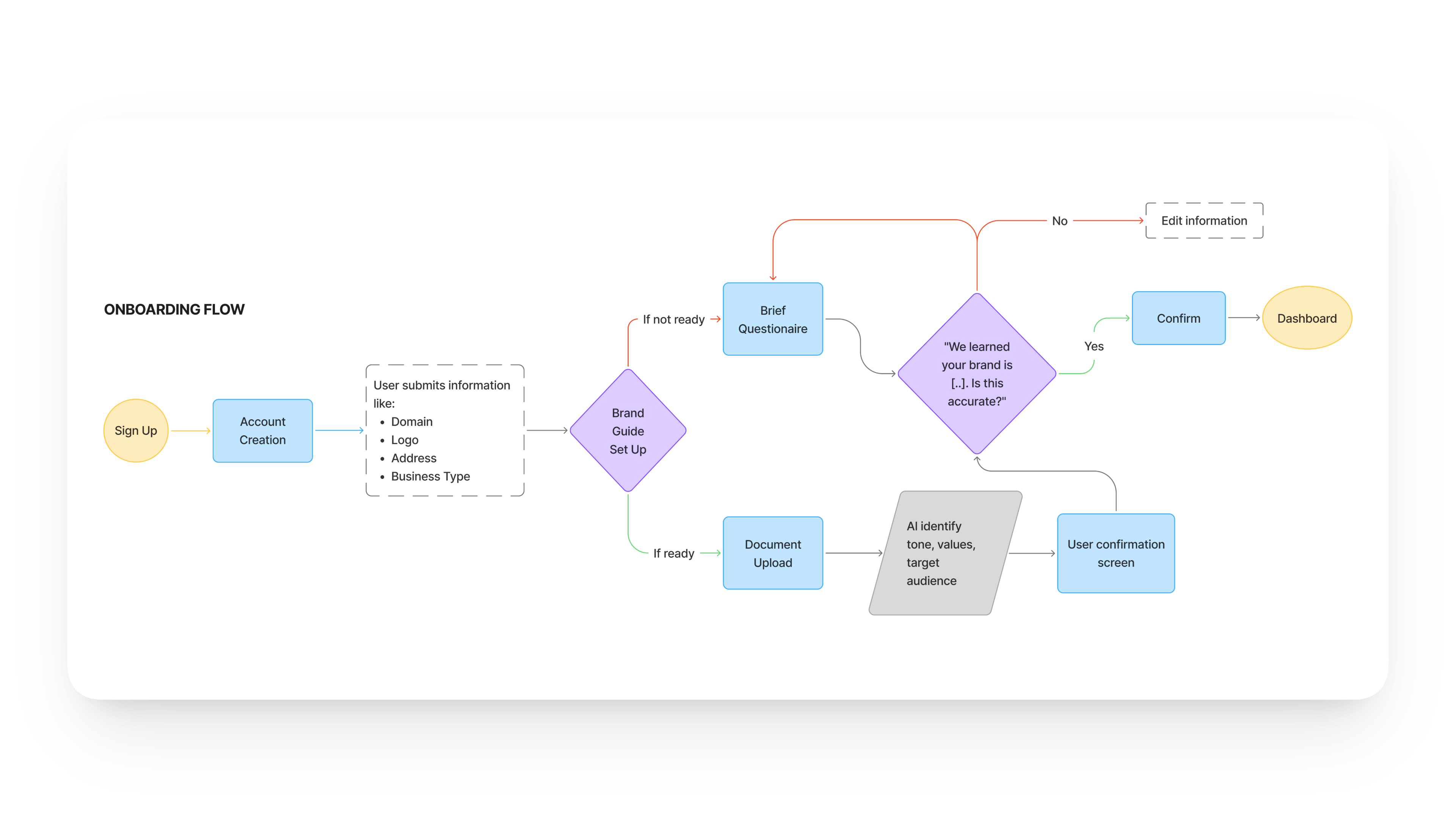
Onboarding: turning data entry into dialogue. The flow collects business information sequentially, with the AI acknowledging input as it's provided. The structural decision here is the absence of a “skip” path. Every field shapes a downstream recommendation, so the flow is short and complete rather than fast and skippable.
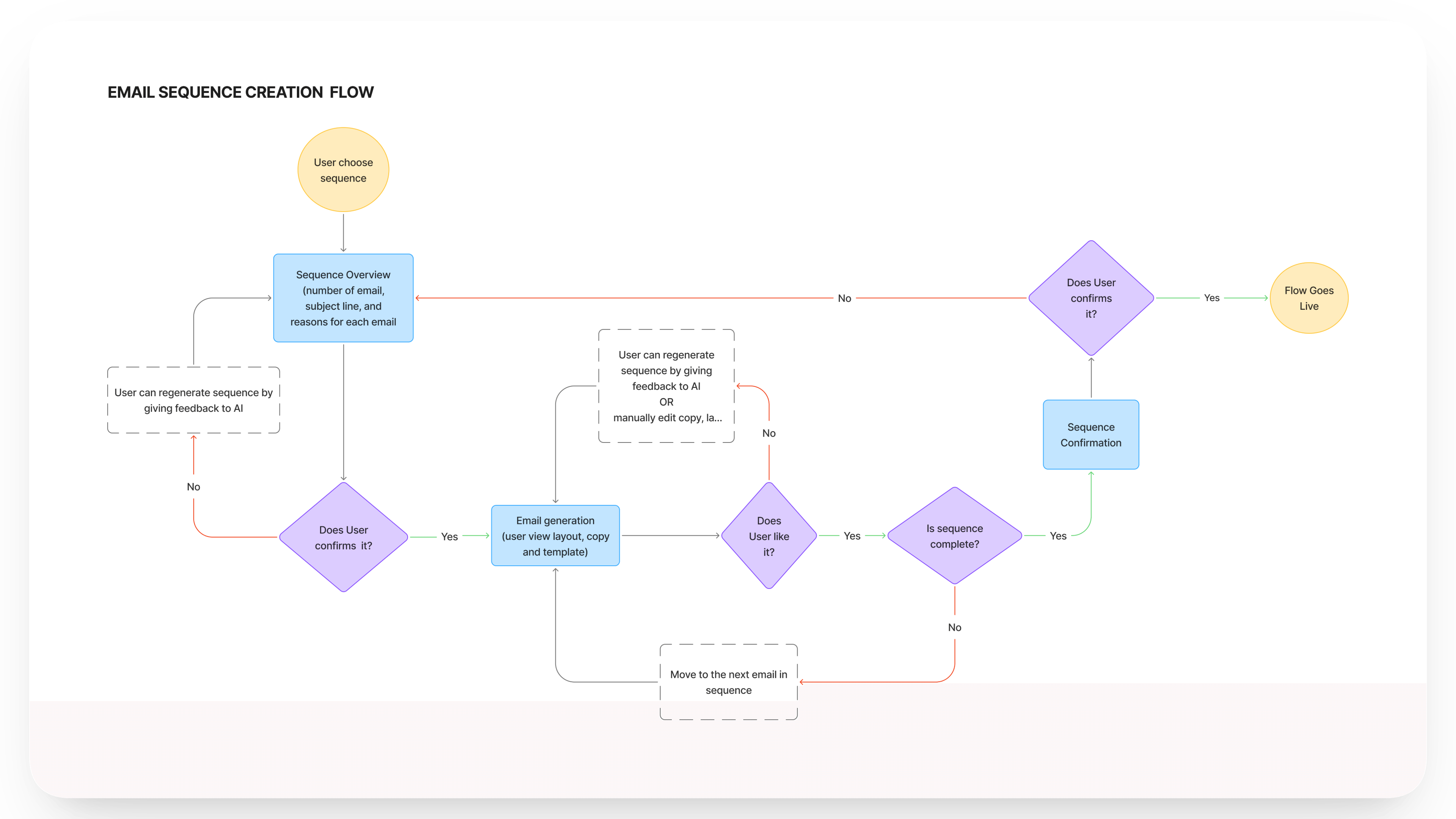
Sequence creation: AI proposes, user approves. From dashboard chat, to pre-built sequence, to per-email review, to activation. The flow has approval gates at every transition, and the activation CTA stays disabled until every email has been reviewed. This was the clearest place to prove that AI proposes, never acts wasn't just a tagline.
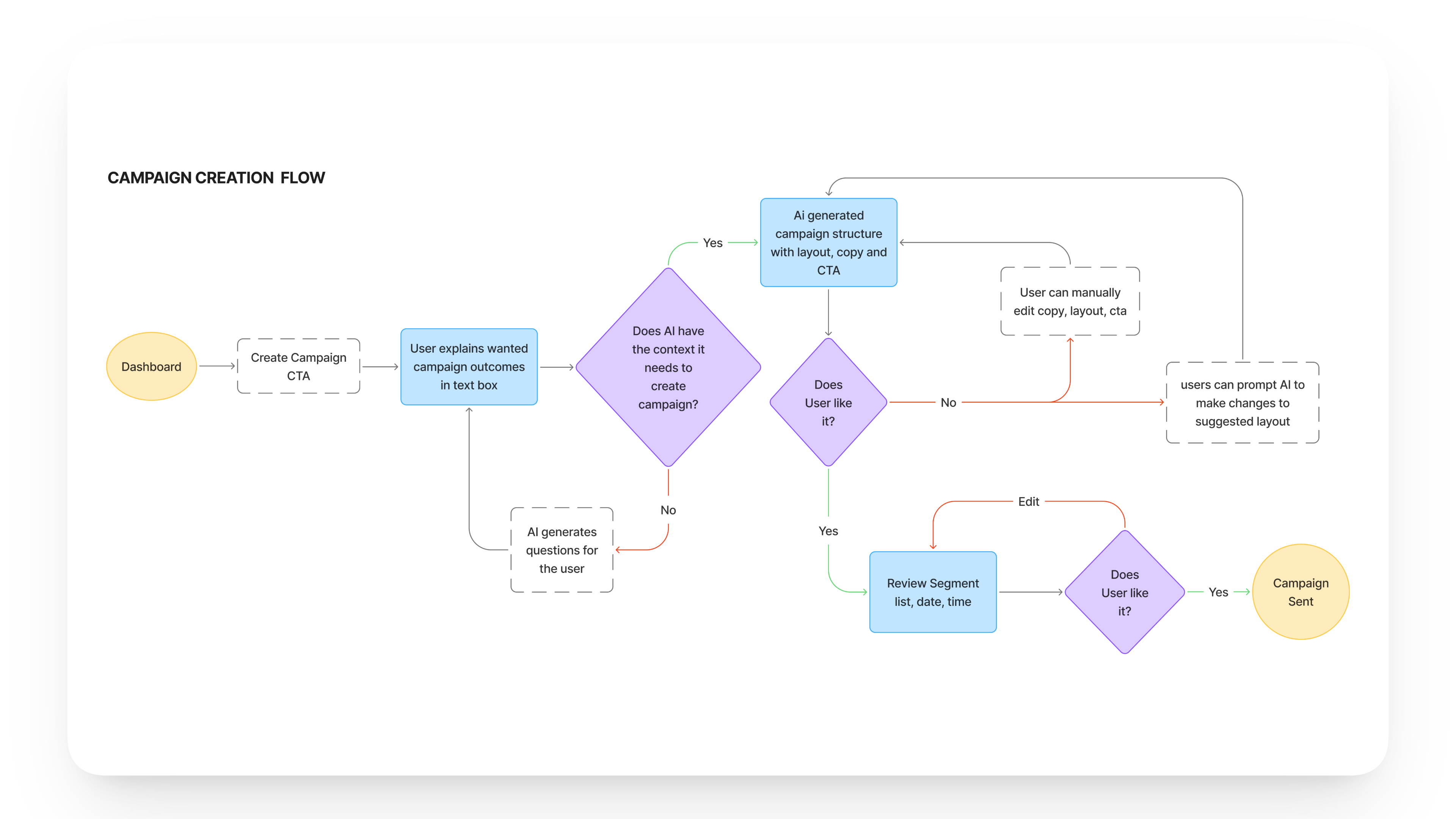
One-time email creation: chat-first, editor second. The flow begins in the chat input on the dashboard, where the user describes what they want to send. The AI returns a draft, and the editor opens with content already in place. The user is never staring at a blank composer.
Mid-Fidelity Design
Mid-fidelity wasn't about visual polish. It was about pressure-testing the strategic decisions before committing to a visual system. Every screen at this stage was a bet I needed to validate or invalidate before going further.
The five flows tested in Round 1 covered onboarding, dashboard, sequence creation, one-time email creation, and pre-send review. Three screens carried the most weight in setting up the design's core assumptions.
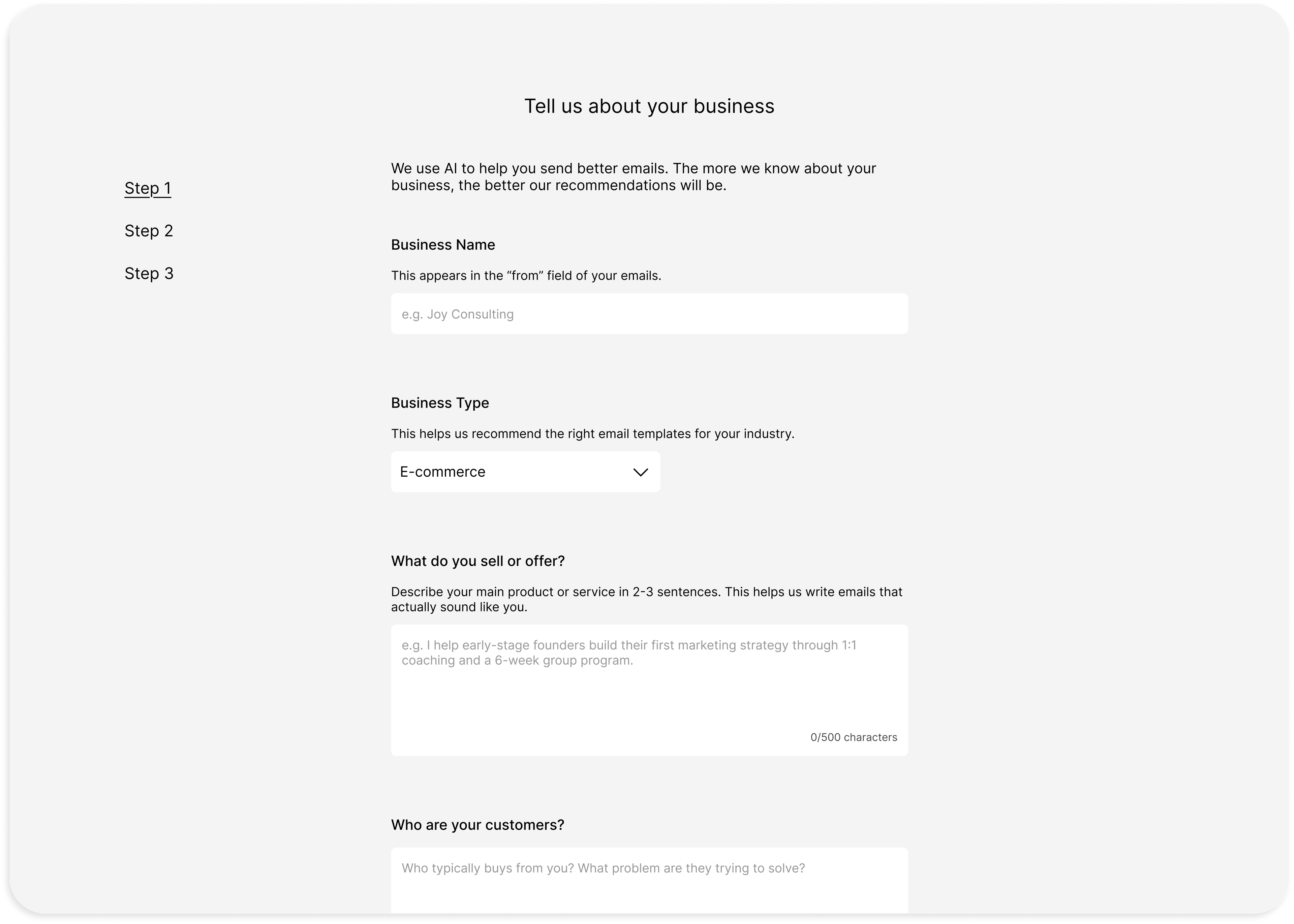
Onboarding: keep it familiar, lower the barrier. The decision here was deliberate restraint. The target user is busy, not tech-savvy, and may have abandoned other tools at this exact stage. A single-column form collecting business name, type, product description, customer profile, tone preference, and starting goal felt like the lowest-friction path. A summary review screen at the end signalled that the AI had captured what mattered. The bet: familiarity wins over differentiation when the user's first instinct is to bounce.
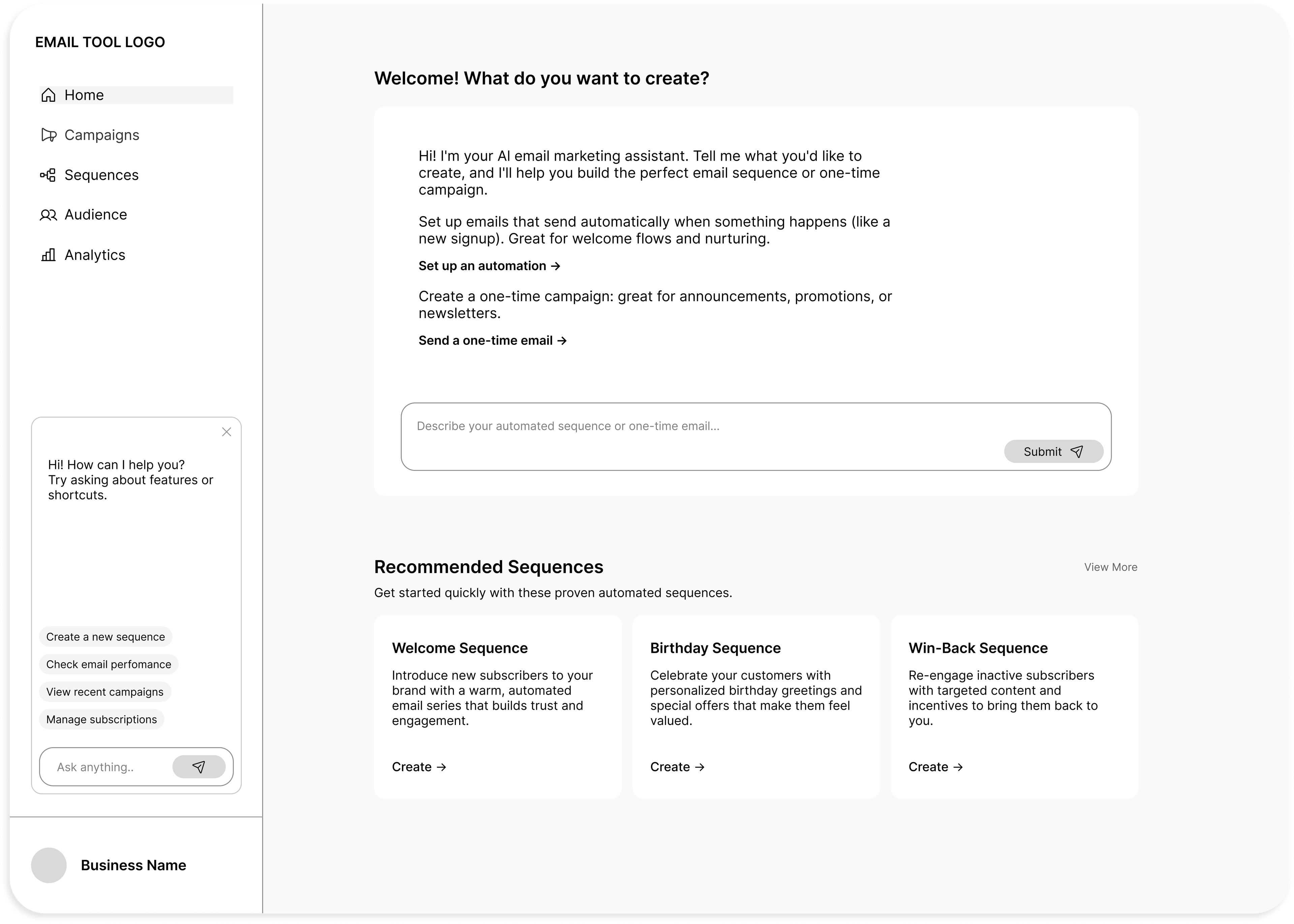
Dashboard: AI chat as the entry, recommended sequences as the safety net. The dashboard introduced the two ideas most central to the product. An AI chat input sat at the top as the primary action, and Recommended Sequence cards beneath surfaced what automated email sequences were and why they mattered. For first-time users, the AI introduced itself and offered two clear starting paths. For returning users, analytics appeared below the fold. The bet: users would understand the chat input was the primary entry, with the recommended cards as a fallback when they didn't know what to ask.
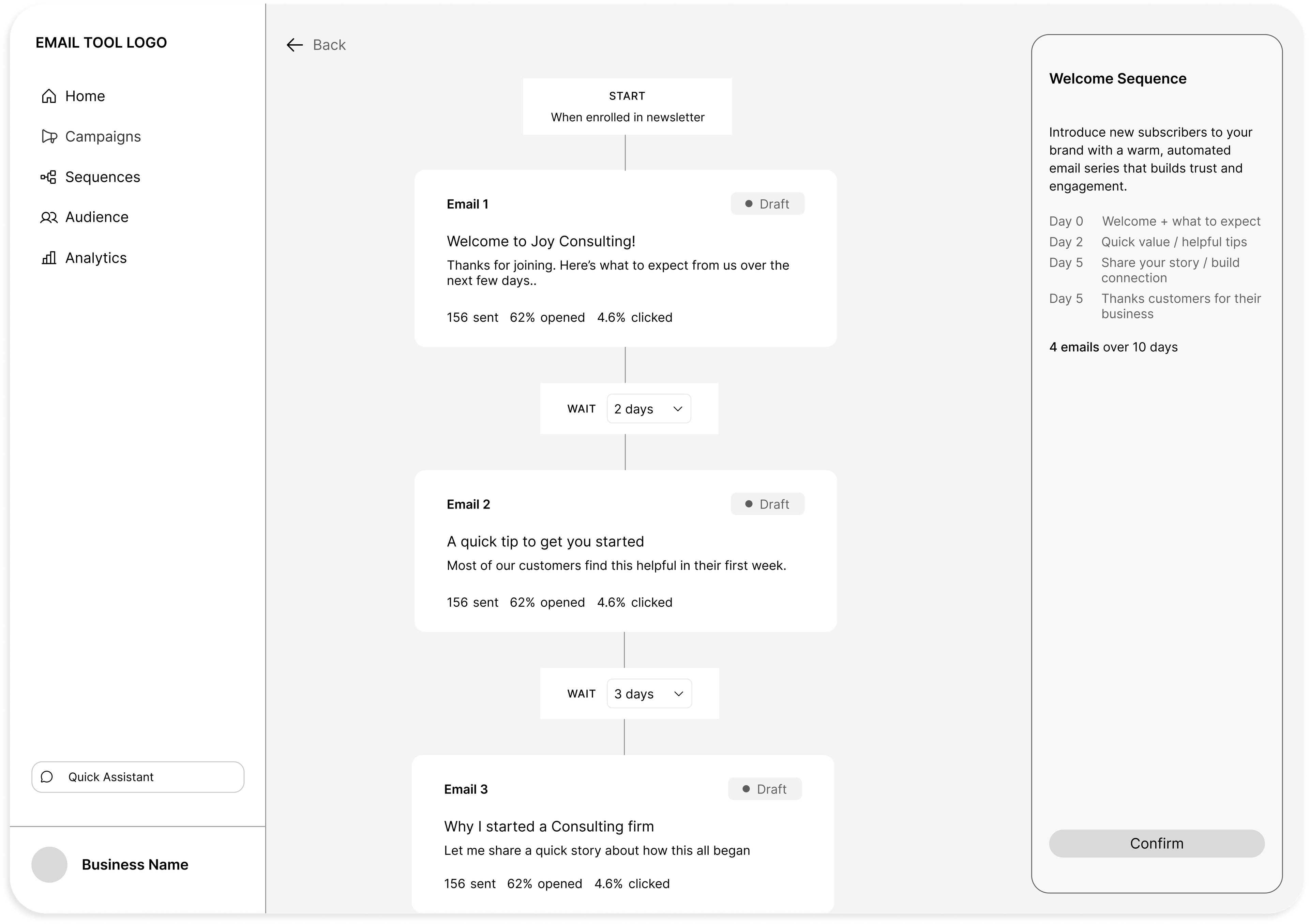
Sequence overview: AI rationale on the right, Confirm to go live. Sequence and campaign overviews shared a consistent pattern. Content sat in the centre, and a right panel summarised the AI's strategic decisions (audience selection, send timing, sequence structure). A Confirm CTA at the bottom of the right panel triggered activation. The bet: users would read the AI's rationale, understand the value, and commit with confidence.
The other tested screens (one-time email creation and pre-send review) carried smaller assumptions, mostly around the dual-mode editor (direct text plus AI prompt panel) and the test-send and scheduling moment before launch.
These were the assumptions Round 1 was designed to test. Some held up. Several didn't.
Two rounds of moderated usability testing shaped the design. Round 1 stress-tested the mid-fi prototype; Round 2 tested the hi-fi build. Both rounds shared one structure: behavior-led tasks, think-aloud protocol, and findings ranked by severity rather than frequency.
What changed between them was not the methodology. It was the question. Round 1 asked: do users understand what they're doing? Round 2 asked: do users understand why they're doing it?
Round 1: Mid-Fidelity Testing
METHODOLOGY 4 moderated remote sessions, 33 to 110 minutes each Figma clickable prototype, Google Meet with screen sharing Recorded via Fathom for transcripts and review Six screens tested: onboarding, dashboard, sequence creation, one-time email creation, pre-send review, analytics All 4 participants had minimal email marketing experience, matching the target persona
The headline finding from Round 1 wasn't a feature problem. It was a confidence problem.
Across all four sessions, the same pattern surfaced. Users could complete tasks, but they couldn't tell whether they had done them correctly. The critical issues clustered around moments where users needed to feel they were in control of their own actions, and the design had quietly removed that signal.
Three critical findings captured the pattern most clearly.
Users clicked Confirm to dismiss the side panel, not to publish a live sequence.
The right-hand AI rationale panel read visually as a temporary overlay that needed to be dismissed. Three users clicked Confirm thinking they were closing it. One published an incomplete sequence, only the first of three emails edited, and didn't realize until I told her. The interaction was treating an irreversible action as if it were a tooltip dismiss.
The AI segmentation rationale was misread as a form validation indicator.
The blue helper text explaining why the AI selected a particular audience was the platform's clearest demonstration of strategic value. Users skipped it. The visual treatment looked like the standard “field validated” cue from web forms, so users registered it as a status signal rather than information worth reading. The platform's core differentiator was being made invisible by its own visual language.
Three of four users couldn't reliably distinguish “campaign” from “sequence.”
The product is conceptually built on this split. Users who couldn't hold the distinction couldn't form a mental model of what they were creating, where to find it later, or what success would even look like. The terminology was the IA, and the IA was unfamiliar.
The full findings list contained 24 issues mapped against severity. The table is included for reference, but the three findings above did most of the work in shaping what changed next.
What Was Already Working
Not everything broke. Several mid-fi decisions tested as strongly as I'd hoped, and they became anchors for the high-fidelity build.
- Recommended sequences reduced decision paralysis. All four users gravitated to the recommended cards as their first action on the dashboard. The blank-page problem was being solved exactly as designed.
- Inline contextual tips were read, trusted, and credited. Users described the small tip boxes as the moment they “got” what to do next. Passive guidance was working better than any modal or tour would have.
- The pre-send review screen built genuine confidence. One user described it as the moment she “started feeling good about sending.” The combination of mobile preview, test send, and scheduling sat exactly where the anxiety was.
- The dual-mode editor met expectations. The combination of direct text editing and the AI rewrite prompt panel landed cleanly. Users distinguished AI-assisted editing from manual editing without help.
Iterations Triggered Between Rounds
The Round 1 findings translated into 24 specific changes. Four of those changes were strategic. They reshaped the design's logic, not just its surface.
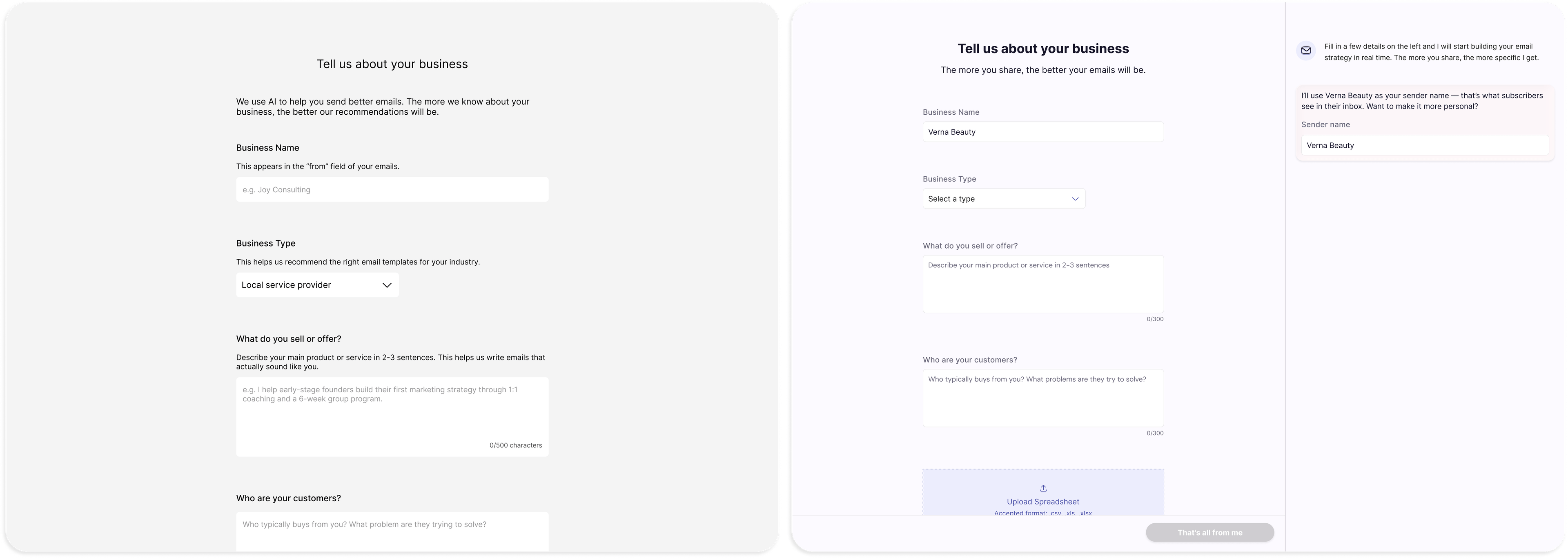
Onboarding shifted from form to dialogue. The single-column form was replaced with a split layout. As users filled in fields, a live AI reaction panel on the right updated in real time, narrating what it was learning about their business. The goal was to demonstrate AI value before the user ever reached the dashboard. The single change reframed the experience from data entry to conversation.
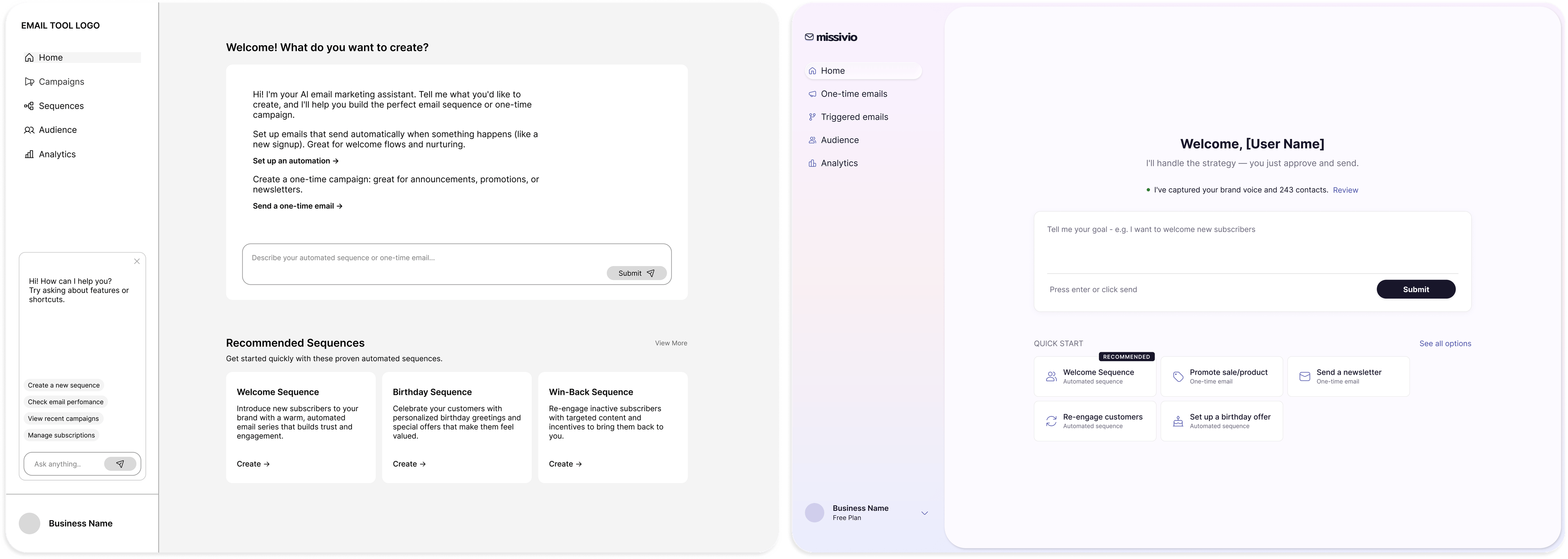
The dashboard reframed entry as conversation. The chat input became the dominant element on the page, scaled up and given anchor visual weight. Quick Start cards beneath it were redesigned as shortcuts that populated the chat rather than navigating directly. The goal was to teach users that the AI is the entry point, not a feature buried inside one. Each card was also labelled by type (Automated emails or One-time email) to begin closing the terminology gap.
Mental-model labels replaced product labels. “Campaign” and “Sequence” were demoted internally. In the navigation and on every Quick Start card, the labels became Automated emails and One-time email. This wasn't a final fix (Round 2 would push Automated further toward Triggered), but it was the structural shift that made the IA legible.
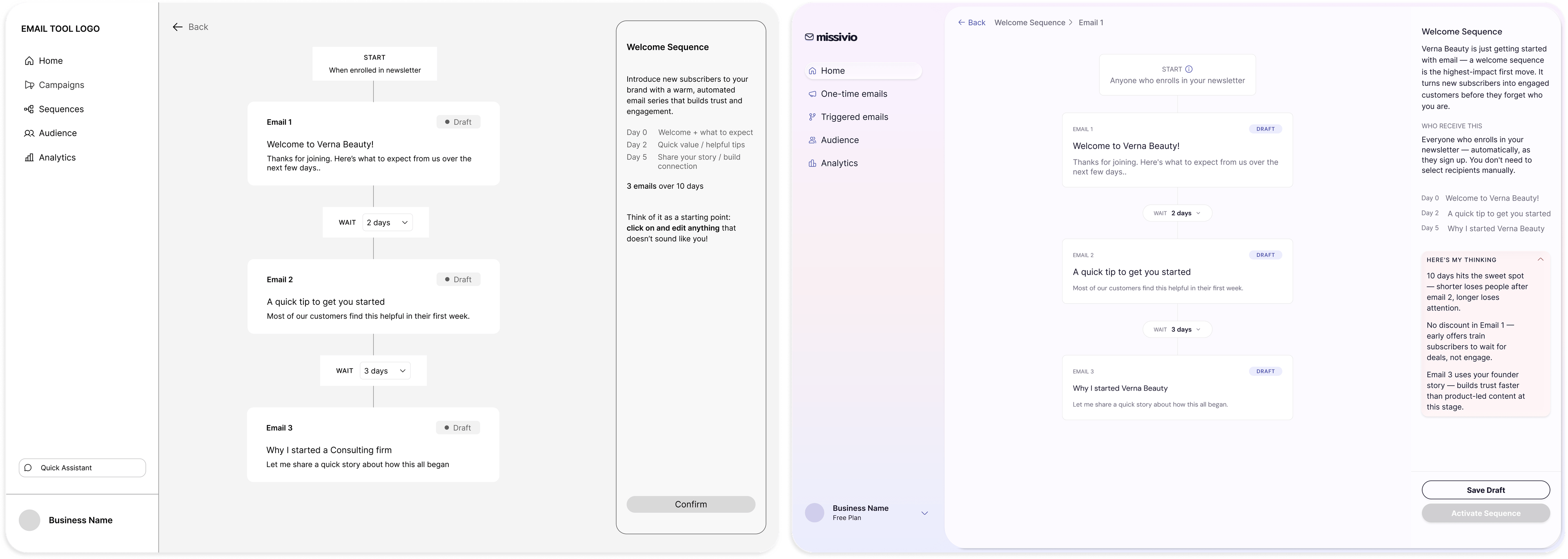
The right panel was rebuilt to stop reading as a popup. It was widened and weighted into the page layout so it could no longer be mistaken for a dismissible overlay. The Confirm CTA was renamed Activate Sequence throughout. An AI reasoning dropdown was added, giving the rationale its own collapsible space rather than competing with the rest of the panel for attention.
These four changes set up the high-fidelity build. The rest of the must-fix and should-fix list was applied in parallel as the visual system came together.
The high-fidelity stage was where the iterations from Round 1 actually got built. Visual identity wasn't a separate phase. It was the layer that made the design's principles legible.
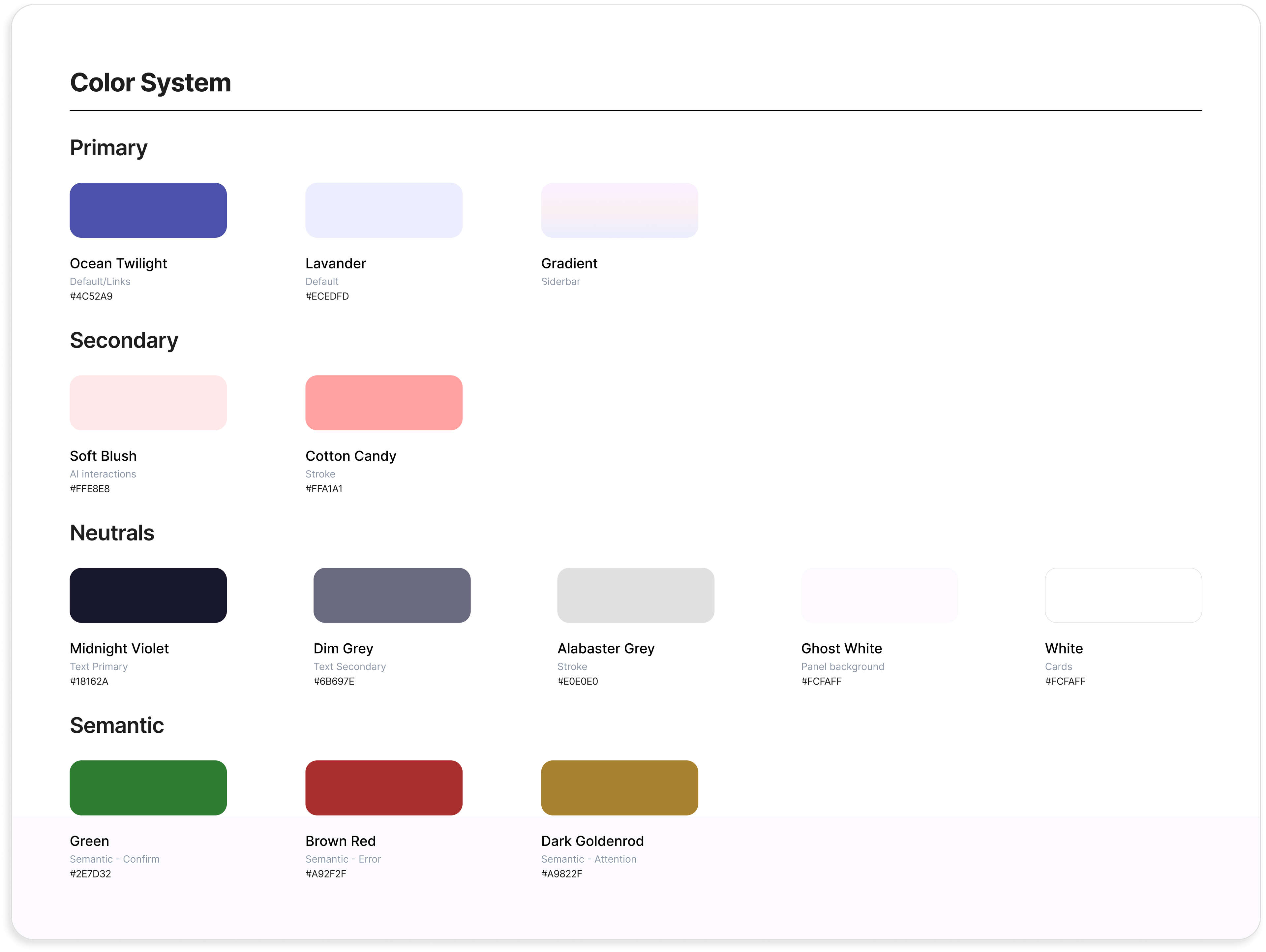
The Iris palette was a strategic choice, not an aesthetic one. The competitive landscape leaned heavily on blues, teals, and greens, all colors the category had taught users to associate with productivity tools and form fields. For a product whose core principle is anxiety reduction, the visual default needed to feel softer, warmer, and less institutional. The primary violet (#7C79C6) and rose accent (#C478A8) sit in a register most email tools don't occupy. The background (#F2F1F8) and sidebar (#E8E6F4) keep the interface low-contrast at rest, with saturation reserved for action moments.
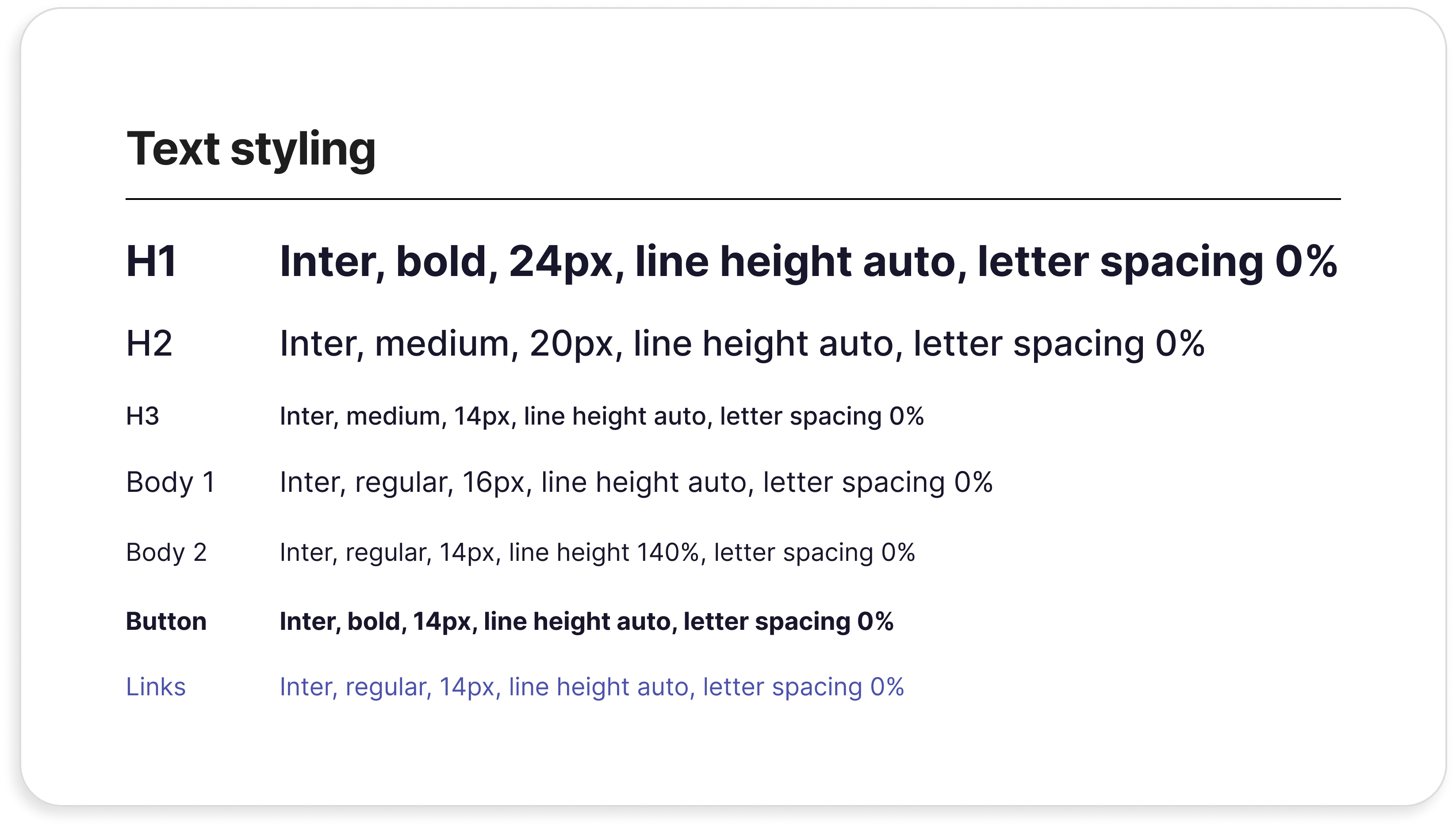
Typography stayed disciplined. Inter for everything. One typeface, weighted hierarchy, no display fonts. The product had enough conceptual newness to introduce; the typography had no business adding more.
Name exploration and rationale.
Round 2: High-fidelity
The hi-fi build realised the four strategic iterations from Round 1 inside this visual system. The dashboard's chat input got proper anchor weight. The onboarding's split layout became a real conversation. The sequence panel was rebuilt with hierarchy that read as page structure, not floating overlay. The hi-fi prototype was what Round 2 tested.
METHODOLOGY 4 moderated remote sessions across the three core flows (onboarding, sequence creation, one-time email creation) Same think-aloud format and participant profile as Round 1 Hi-fi Figma prototype, full visual system applied
Round 2 surfaced a different problem from Round 1. Users trusted the tool. They just couldn't see what it was thinking clearly enough to act with confidence.
The platform's strategic value was now technically present on the screen, in the AI rationale panels, the reasoning dropdowns, and the per-email decision summaries. It just wasn't being read.
AI reasoning panels were too text-dense to engage with.
Three users skimmed or skipped the rationale sidebars entirely. The fourth read them and described them as the moment she felt the AI “knew what it was doing.” The problem wasn't the content. Users who engaged with it responded strongly. The problem was that dense text creates visual weight users instinctively avoid.
The onboarding AI panel was mostly ignored after the first two responses.
The split layout was supposed to create momentum. For three of four users, it created interruption instead. Once the novelty of the live reaction wore off, users tuned out the right side of the screen and focused on the form. The panel was earning attention only at the start of the flow.
Post-activation confirmation was dismissed too quickly to register.
A timed overlay card appeared after a sequence was activated, then disappeared. Users weren't sure the action had registered, and had no clear path to review what had just gone live. The most important moment in the product was the one users were most likely to miss.
What Round 2 Confirmed Was Working
- Live AI reactions during onboarding motivated users to keep going. One user described feeling “like it's taking into account the information I'm putting in.” The principle was right; only the format needed work.
- The AI chat handoff and Quick Start cards were immediately understood. Users typed into the chat without prompting, used the cards as primers, and rarely paused at the dashboard. The Round 1 reframe held.
- Quick Start shortcuts were appreciated, and missed when absent. Returning users specifically noticed their absence on the alternative dashboard view. The shortcuts had become a habit loop in just one session.
- Email editor quality exceeded expectations. Users called the editor itself a credibility moment for the product.
Round 2 taught me a sharper version of a familiar lesson. The right content shown in the wrong format is indistinguishable from the wrong content. Every final iteration was about making the AI's reasoning accessible without making the interface heavier.
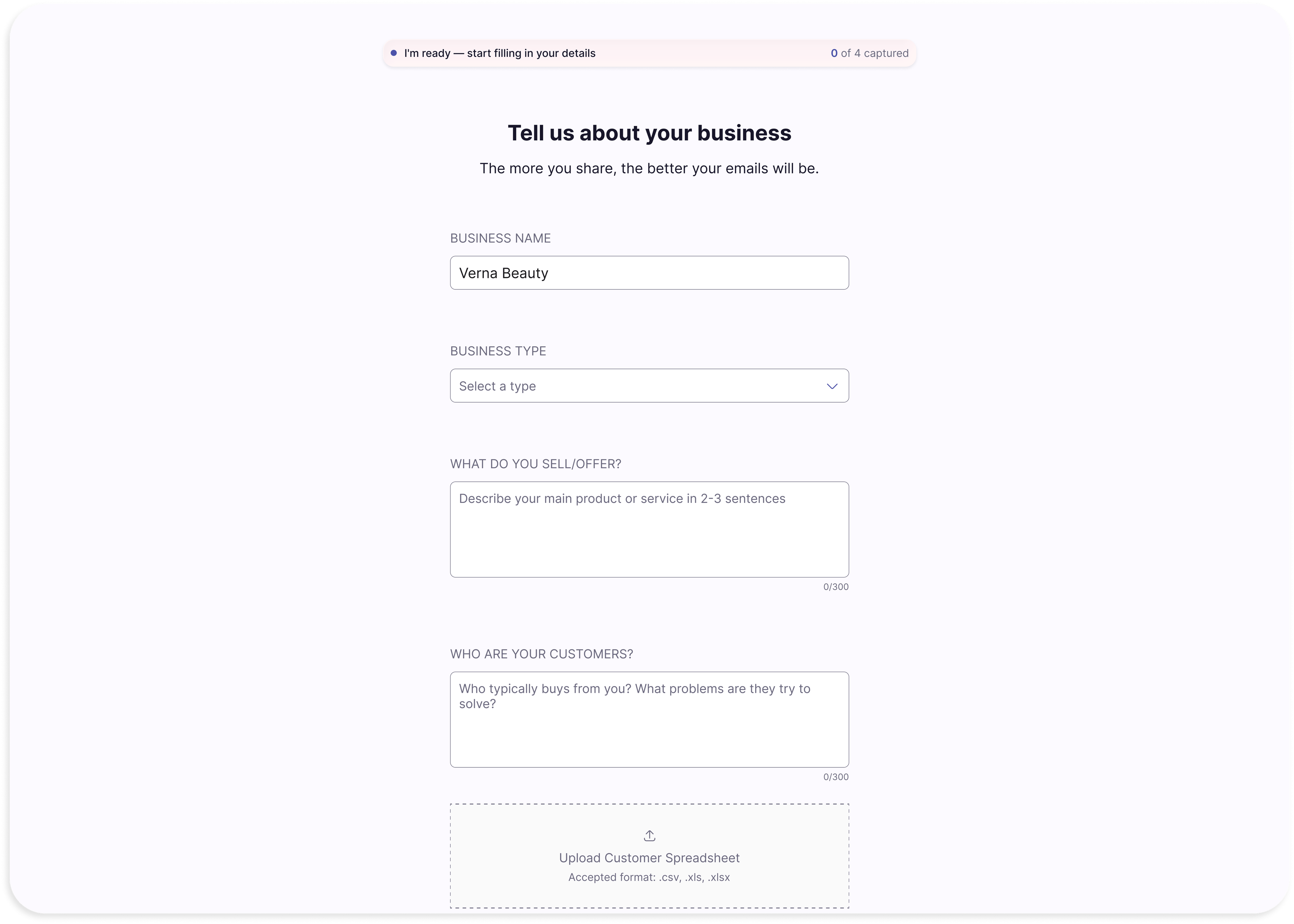
Onboarding's split panel became a sticky acknowledgment bar. As users fill in fields, a single horizontal element at the top of the screen updates with brief confirmations. Users who want reassurance get it. Users who want to move fast can ignore it. A “Here's what I've got” modal at the end summarizes the AI's understanding before handing off to the dashboard. The bar replaced interruption with presence.
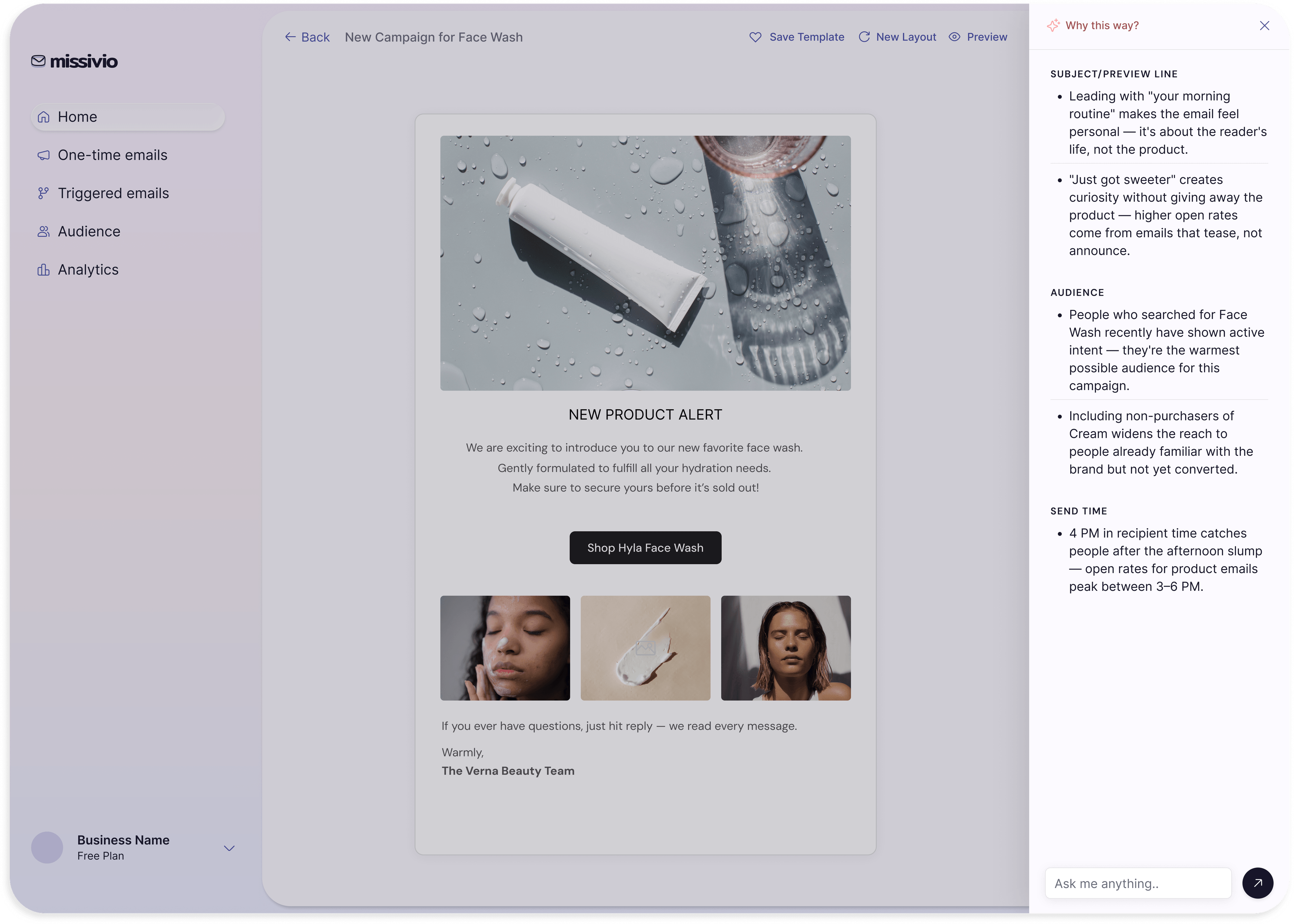
The dense AI rationale dropdown was replaced with a “Why this way?” button. Round 2 showed users instinctively avoided the heavy “Here's my thinking” disclosure. The fix was structural: the rationale moved out of the main view entirely, behind a persistent button in the top right of the sequence and email screens. Users who want the depth get it on demand. Users who don't are no longer paying a visual cost for content they're going to skip anyway.
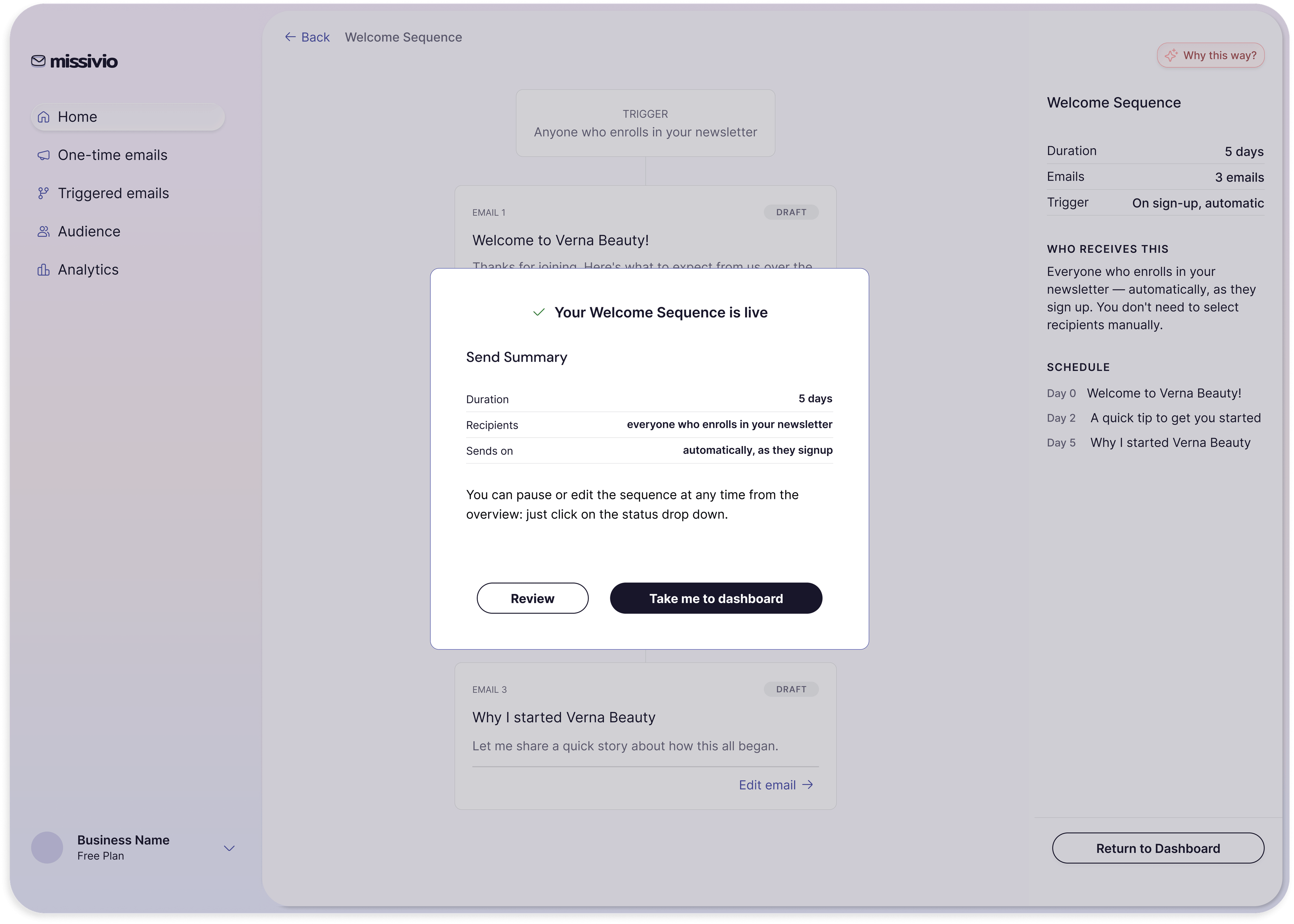
The timed activation overlay became a deliberate confirmation modal. When a sequence is activated, a full modal appears showing the send summary (recipients, duration, send time) and offers two clear paths: Review or Take me to the dashboard. The user has to actively choose what happens next. Activation, the most consequential action in the product, now has the weight of an action.
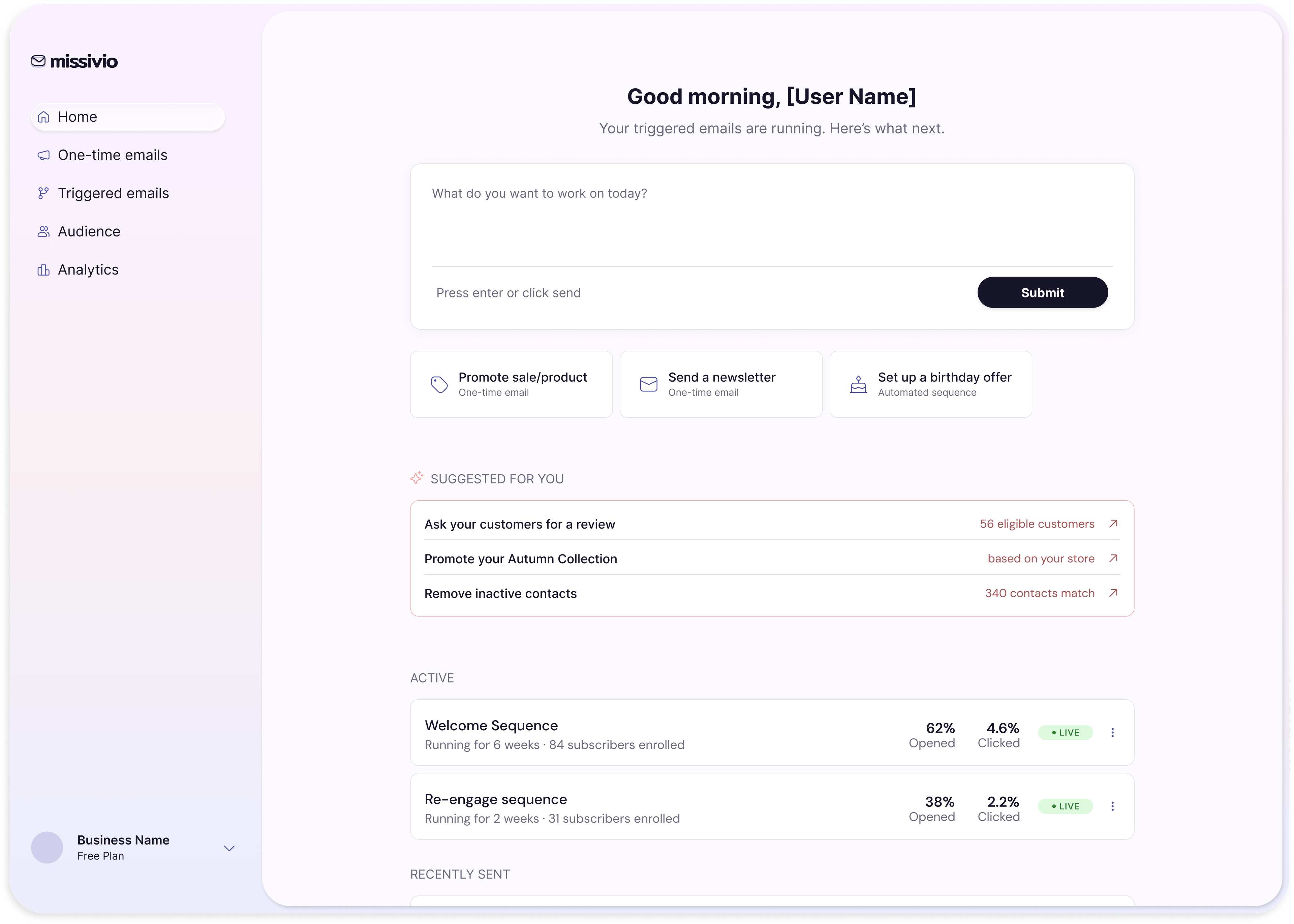
The returning dashboard kept its structure but lightened its content. The text-heavy “Recommended Actions” card became a “Suggested for you” list with contextual helper text shown inline (“56 eligible customers,” “based on your store”). Quick Start shortcuts were preserved to protect the habit loop Round 2 confirmed was working.
The navigation labels were finalised. “Automated emails” became “Triggered emails,” matching the language users themselves reached for when describing how the emails would behave. “One-time email” was validated by Round 2 testers' mental models and kept unchanged.
Visual weight was stripped back across the email editors. Editable input fields were stroked to signal interactivity. AI rewrite suggestions became a “Rewrite with AI” text link rather than pills, expanding an inline prompt in the AI's signature Soft Blush colour. The “Activate Sequence” CTA stayed disabled until all emails in a sequence had been reviewed, with a hover state explaining why.
These iterations closed the gap between the AI is doing strategic work and the user can see the AI doing strategic work. That gap had been the whole point.
What I would do differently
- I'd test naming conventions earlier. The distinction between campaigns and sequences (and later automated emails and triggered emails) caused confusion across both rounds of testing. Structural language is design work, and it should be tested with the same rigor as any other interaction. Catching the labels in low-fidelity prototypes, before any visual design existed to defend, would have saved iteration cycles in both rounds.
- I'd treat invitation to read as a design problem, not a copy problem. The AI reasoning panels were strong from the start. The content was right. The format was wrong. The lesson was that the moment a user decides whether something is worth their attention is itself a design moment, separate from what they read once they get there. If I'd designed for that moment first, the rationale wouldn't have needed to be moved twice.
What production would require
This case study covers the design of an MVP. A production version would extend in three directions.
- A/B testing. Surfaced repeatedly in research and competitive analysis as a meaningful signal. Deferred for MVP focus, but the natural next layer once the core flows are validated.
- Multi-user accounts. Single-user scope kept the trust model simple. A team-and-seats model would require rethinking approval workflows, role permissions, and the visibility of AI reasoning across stakeholders.
- Compliance and deliverability. GDPR consent flows, unsubscribe management, deliverability monitoring. Treated as out of scope for the MVP design, but production-critical and worthy of their own design phase.
What this project taught me about design
Missivio started as a response to something I watched happen repeatedly in my career: capable people made helpless by tools that assumed too much. But what this project taught me is that knowing the problem isn't enough. Every assumption I brought from my professional experience still had to be tested, challenged, and sometimes discarded.
That tension between domain expertise and design humility is what I'll carry into every project after this.