BRAZILY
04When Brazily's first iOS app was rejected by the App Store, the easy read was 'fix the policy violations.' The harder, more valuable read was that the app reproduced the same problem the web platform already had: a freemium model that was invisible in the UI, and no orientation path for new users. This case study is about the decisions that fixed that, and the AI-augmented workflow that let me explore them faster and more rigorously than the timeline should have allowed.
I owned the design across onboarding, dashboard, and course discovery, partnering with a UX/UI designer on competitor and market research and wireframe refinements.
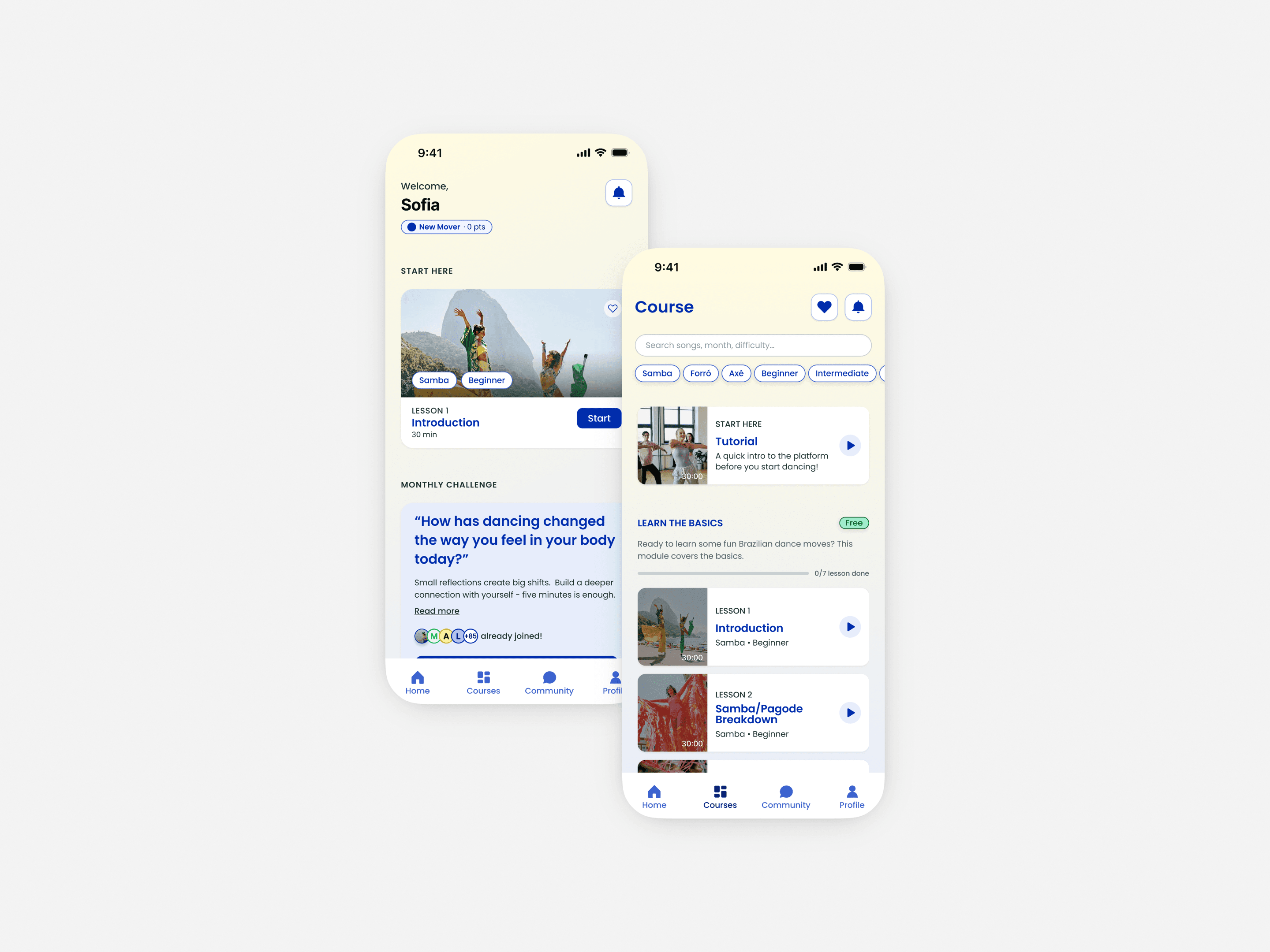
The drop-off wasn't a content problem.
Brazily Fitness's first iOS app was rejected before a single user could download it. Built as a web view wrapped in an app shell, it tripped Apple's policy restrictions on day one. That forced the real conversation (build a genuine native app) and opened the chance to fix what wasn't working underneath.
The content was strong and the community engaged, but mobile bounce was high. The freemium model was invisible in the UI, membership lived entirely off-platform, and new visitors had no path to orient themselves. The drop-off wasn't about content quality. It was navigation.
Finding the real problem.
A platform audit and a competitor teardown of Zumba and SHiNE Dance Fitness surfaced the same pattern: the drop-off was navigation, not content. Users couldn't orient themselves: the platform expected them to arrive with a mental model it had never given them.
An AI-augmented workflow let me move from raw observations to a structured gap analysis in one focused session instead of several, framing I could act on and put in front of the client immediately.
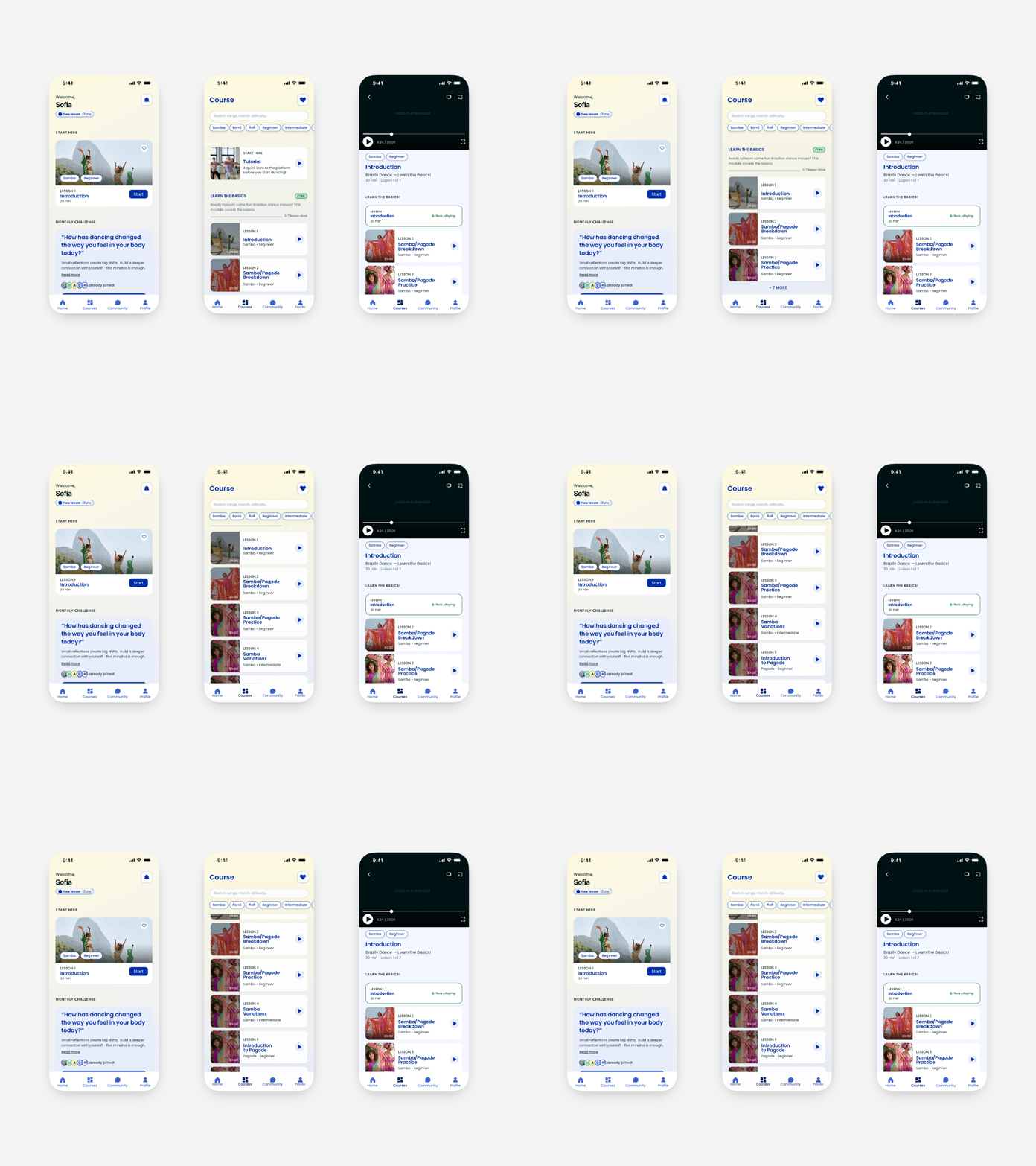
From dashboard, passing to courses tab, to the actual video lesson.
The “Course” screen is where the most consequential design work happened.
The original platform didn't organize content: users who came through a direct link weren't aware of membership-exclusive content, and the ones that did had a hard time finding it.
After creating a user-friendly path to courses, I explored organizing content by dance style with free and locked classes coexisting within each section. The logic was sound: users come to Brazily to learn a specific style, not for a tier structure. But the owner pushed back: the sequence of videos matters to how the content is taught, and breaking it apart by style would disrupt that progression.
The final model kept the open layout with all lessons visible, grouped by course (March 2026, April 2026), preserving the pedagogical order while still solving the original problem: users could see what was available, what was accessible, and where they were in the content. And because the app couldn't sell membership (that lived in GoHighLevel, off-platform), making the model visible wasn't a nice-to-have, it was the only lever I had. The open, course-grouped layout surfaced the freemium structure for the first time: not as a sales prompt, but as orientation.
Navigation architecture followed the same logic: single scroll, no tabs, with a chip row for filtering. Simple enough for a new visitor, functional enough for an active member.
The constraints shaped the build more than any aesthetic choice.
This app didn't exist in isolation. It sat on a backend I didn't own and a platform with hard rules.
Native, not a wrapper. The first submission was a webview in an app shell, rejected under Apple's Guideline 4.2, compounded by an SSO conflict with the membership backend. A genuinely native rebuild wasn't a preference; it was the only path to the store, and what made the rest of the redesign possible.
Membership the app couldn't sell. Membership lived in GoHighLevel, and replacing it was out of scope. So the problem was never ‘add a buy button’, it was making an externally-managed membership legible inside the app: showing what was free, what was locked, and routing cleanly to the web for purchase without the app transacting.
The auth handoff. A member who subscribed on the web still has to be recognized in the app, and the original build had failed on exactly this. With three user types holding different permissions, I designed onboarding and access logic around that handoff, not around an in-app signup that doesn't exist.
Account deletion, by requirement. Apple's Guideline 5.1.1(v) requires in-app account deletion for any app supporting account creation. Even with membership managed externally, I designed a clear, findable deletion path, because the requirement is about user control, not box-ticking.
Progress on real watch state. Completion was tied to actual playback, not self-report, so the progress UI had to reflect viewing data directly, a small data-model decision with a direct effect on how ‘pick up where you left off’ behaved across the dashboard and course screens.
The dashboard contains main elements like ‘next lesson’, community challenges, upcoming events and a prompt that showcases the freemium model. All these elements were marked as priority during research.
What testing confirmed
Moderated usability testing validated what research had pinpointed: the orientation gap (users not being able to tell what was free versus membership-locked) was the core driver of drop-off. The Course screen was designed to close it.
An AI-augmented process, built before the first screen.
The timeline was tight, so before designing a single screen I built reusable infrastructure: a set of custom Claude skills that encode my methodology (wireframe generation, competitor analysis, UX collaboration, usability reporting, and front-end quality). Paired with Claude Code and Figma MCP, that let me generate wireframe hypotheses, stress-test the IA, and weigh three real design directions in a single afternoon instead of across several sessions, rigor the schedule wouldn't otherwise have allowed.
Defines layout logic, content hierarchy, and fidelity level for mobile screens. Rather than producing generic placeholders, it generates layouts that match the project's navigation architecture and content model, with realistic labels and interaction states.
Keeps iterative screen work grounded in established project decisions. When working through multiple screen variations in a single session, this skill ensures each iteration builds on what was decided before rather than drifting or restarting from defaults.
Structures competitive findings into UX-relevant gaps rather than simple feature comparisons. It produces analysis around what each platform fails to do for the user, which is the actual useful output for design decision-making.
Shapes usability findings into a stakeholder-ready narrative. It prioritizes findings by severity, connects observations to design implications, and frames everything in language a client without a design background can evaluate and respond to.
Ensures any HTML/CSS output generated meets a quality bar for visual structure, hierarchy, and layout logic. This is essential for wireframe exploration, where generated screens need to be evaluable as real options, not just functional markup.
I've open-sourced the full skill set so other designers can use and build on it.
A buildable native spec, and a redefinition of the problem.
I handed off a native spec the developer could ship from: onboarding and auth logic for three user types, the course-discovery model, the freemium-as-orientation layout, and the compliance flows (in-app account deletion, off-platform purchase routing) needed to clear the App Store without re-litigating any of it.
The real outcome was a reframe: the rejection looked like a policy problem, but the fix was an orientation problem, and solving that finally gave new users a path the platform never had.